![cohera-tech-logo-tagline-full-colour-rgb-1.svg]](https://support.cohera-tech.com.au/hubfs/cohera-tech-logo-tagline-full-colour-rgb-1.svg)
Before you jump into Vemcount, here are a few helpful things to know.
General Screen Layout
Please view the image below to understand the general layout and menus of Vemcount reporting system. The layout will depend on your user account permissions and settings. Some features may not be visible if they have been deactivated. Please contact your Administrator to enable a feature if it is missing.
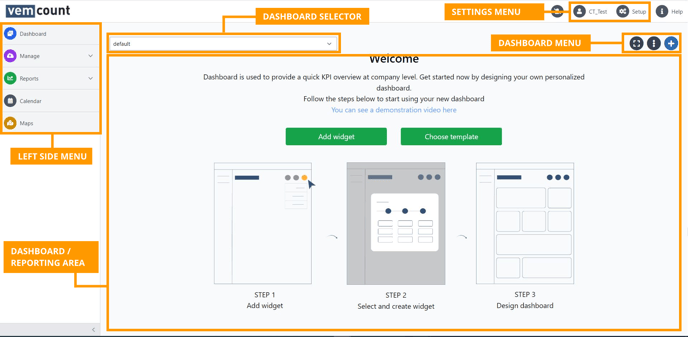
Left Side Menu
Dashboard - changes the main display to dashboard view
Manage - displays additional menu to manage/edit existing data (restricted to Cohera-Tech/Admin level users)
Reports - displays additional menu for reporting
Calendar - changes the display to calendar view for adding events etc.
Maps - changes the display to maps view for heatmap, zone and entry analytics.
Settings Menu
Username icon - opens additional menu to adjust user settings, change password and sign out.
Setup - opens additional menu for adjusting company level settings, sensors and user accounts (restricted to Cohera-Tech/Admin level users)
Help - opens help menu with additional links